
A Complete Walkthrough of How HotelBuddy Connects with Your PMS and Automates the Entire Guest Journey


How HotelBuddy Powers a Fully Digital Guest Experience
HotelBuddy is a contactless guest platform that connects directly with your PMS to automate every stage of the guest journey — from pre-arrival to post-checkout — while keeping your team in control. Think of it as a virtual receptionist that communicates with the PMS in real time thanks to a secure 2-way integration that enables seamless communication at every step of the guest journey.
2-Way Integration Between Your PMS and HotelBuddy Syncs Data Instantly
HotelBuddy currently supports secure, certified integrations with the following Property Management Systems (PMS):
This ensures live synchronization between both systems — any change made in HotelBuddy or your PMS is reflected immediately in the other. Whether it’s a new reservation, a room status change, a housekeeping update, a payment, or guest profile data — HotelBuddy keeps both systems fully synchronized.
HotelBuddy reads and updates various fields in the PMS, such as:
Guest names
Reservation numbers
Room numbers
Room status
Payment information
Charges and revenue codes
Reservation notes
For example, if a guest updates their estimated arrival time or uploads their ID documents through HotelBuddy, those changes are pushed directly into the PMS with no manual input required from your reception team. This reduces administrative workload, eliminates the risk of errors, and ensures your staff always has access to the most up-to-date guest information.
Accurate Field Mapping Guarantees Smart Automation
A two-way integration is powerful but for reliable automation another step is required as every hotel operates a bit differently. Accurate field mapping is one of the steps during the HotelBuddy onboarding process — and it’s more important than it may seem.
Some hotels rely on structured fields like rate codes, while others use unstructured notes for key guest details. HotelBuddy adapts to either approach. HotelBuddy takes these internal procedures into account and maps fields accordingly, so you don’t need to change how your team works. Instead of forcing your staff to adapt to new workflows, HotelBuddy adapts to yours.

Customisable Automation Rules Create A Personalized Guest Experience
Whether you use specific PMS fields to assign packages, capture guest preferences, or identify prepaid bookings, HotelBuddy is configured to read the right data from the start.
This ensures that every automation runs smoothly and is tailored to each guest. For example:
Skip payment steps for prepaid reservations (can be set up based on notes, rate codes, market codes or any other field we can pull from the PMS)
Hide upgrade options when categories are not available (based on the specific rules and availability checks in real time from PMS)
Hide upgrade options on special cases (for example not offering suites to guests with pets).
Send tailored pre-arrival messages based on rate code, market segment, or keywords in reservation notes
These automated controls ensure guests see only relevant options, reduce manual work for staff, and deliver a smooth, personalized check-in experience. Read more about Automation rules.
1. PRE-ARRIVAL
The pre-arrival flow begins the moment a reservation appears in your PMS.
How HotelBuddy uses PMS data
HotelBuddy automatically pulls in key reservation details, including:
Guest name and contact information
Arrival and departure dates
Room type
Rate details and payment information
Number of guests
Reservation notes
Room number and all status changes to enable timely check in
This live data forms the foundation of a personalized online check-in experience.
Pre-arrival communication
To begin any guest communication, HotelBuddy needs access to the guest’s email address or phone number. Even encrypted emails from Booking.com can be used to enable pre-arrival automations.
Based on your automation rules, HotelBuddy sends a branded pre-arrival invitation inviting guests to check in online. Guests receive a secure, tokenized link that opens directly in any browser with no app download required. This ensures universal accessibility and significantly improves conversion rates.
Hotels remain fully in control of:
When the invitation is sent (e.g., 2 days before arrival)
Whether it’s delivered via email or SMS — which is especially helpful when you don’t have an email on file, or both
The visual branding, tone, and message content
The email language can automatically adjust based on the guest’s nationality or preference
All emails can be customized in HotelBuddy’s email editor:
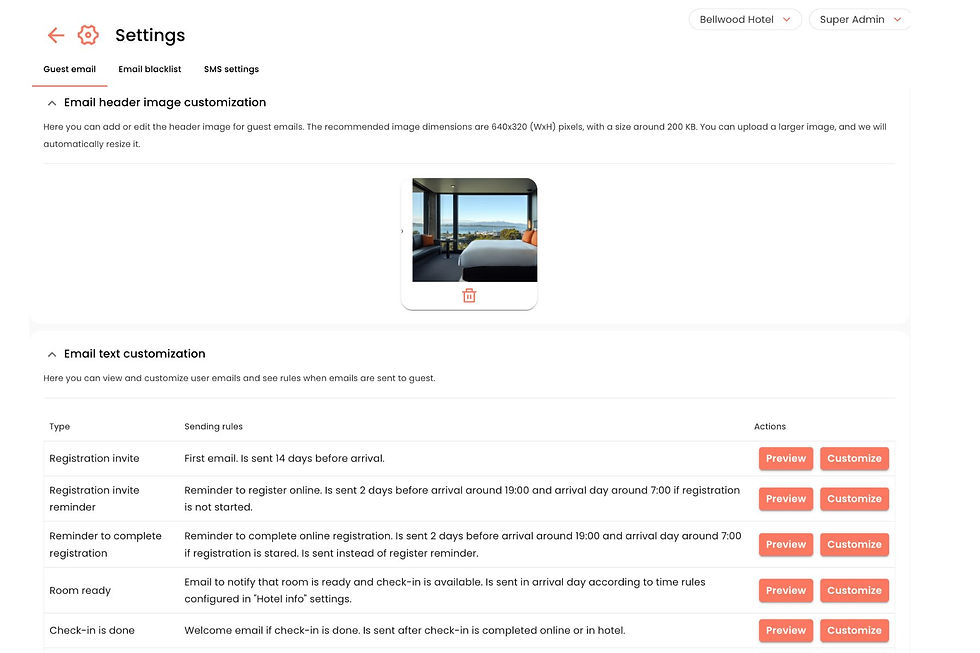
The online check-in data collection
HotelBuddy’s online check-in process is simple, intuitive, and fully customizable. It consists of 4 key steps, designed to collect everything you need for a smooth and compliant arrival, upsell rooms and services and create a personal dashboard for your guests.
Step 1: Filling the Registration Card
Guests begin by filling in their digital registration card. You decide which fields are visible, optional, or mandatory — based on guest nationality and your local legal requirements.
The form can include:
Full name, date of birth, contact information, home address
Details of accompanying guests
Arrival time and transport method
Upload of ID documents
Acceptance of hotel Terms & Conditions
Digital signature (via checkbox or drawing with finger/mouse)
As soon as the guest completes this step, the information is automatically pushed to the PMS via HotelBuddy’s two-way integration — no manual data entry required.
On average, 50–60% of guests who receive the pre-arrival invitation complete at least this step by filling the registration form with their personal information before arrival.

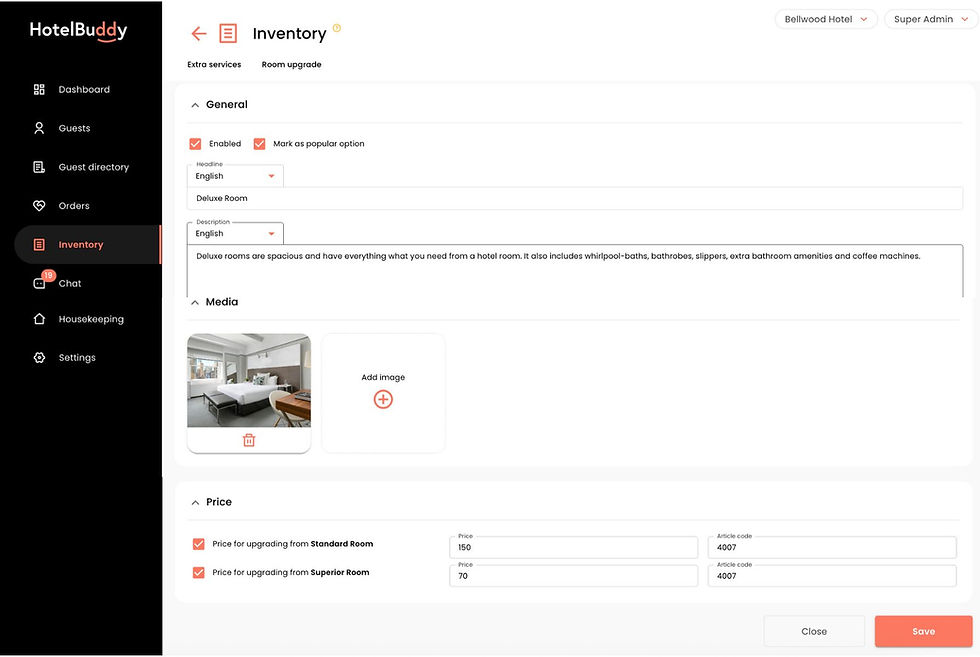
Step 2: Selecting room upgrades
Guests are shown upgrade options based on your inventory and rules. You can control:
Which room categories you want to enable upgrades to
Room upsells may also include package upgrades — for example, a suite with a romantic setup featuring rose petals, champagne, chocolates, and a bouquet of flowers.
Insert pictures and descriptions for each category
Set upgrade prices
Exclude ineligible segments (e.g. pet owners, special package bookers where room setup requires more preparation)
This step is skipped if there is no availability in higher category rooms in your PMS
If the guest opts for an upgrade, the room category is changed in the PMS, the old room is released and upgrade fee added to guests bill. Read more about Room Upgrades.
Step 3: Booking extra services
Guests can browse and book extras such as transfers, parking, dining options, spa treatments or late check-out. These are added to their reservation and synced directly to the PMS. Extra services are explained in more detail in the “During the Stay” section below.
Step 4: Pre-paying for the stay
If your policy requires it, guests can prepay or authorize deposits securely during check-in. HotelBuddy’s automation can skip this step for prepaid bookings, based on rate codes or channel source.
Once the check-in steps are completed, guests are directed to their personal dashboard, where they can explore hotel information, pre-book services, and even start chatting with the reception — all before arrival.
Any details or special requests submitted during the online check in or through the dashboard are instantly synchronized with the PMS, so your team always has the most accurate and up-to-date information.
2. ARRIVAL
Automatic notice to guest to complete check in
On arrival day, HotelBuddy continues its work in the background. For guests who have already completed their online registration, the system checks if:
online check-in window has opened (this can be set to begin a specific number of hours before your standard check-in time),
the room is currently vacant, and
the room’s status in the PMS is marked as “Clean” or “Inspected”
If all three conditions are met, the system pulls the readiness status from the PMS and immediately notifies the guest via email or SMS. Guests can then finish their check-in from their phone. If mobile keys are enabled, they can go straight to the room. If not, the system directs them to the front desk — with all arrival tasks already completed.
If the hotel has enabled automatic room assignment, HotelBuddy can select an appropriate room based on room type, availability, clean/dirty status, guest preferences, hotel-defined allocation rules.
Once a guest checks in through Hotelbuddy, their check-in status is automatically updated in the PMS.

2. DURING THE STAY
During their stay, guests can use Hotelbuddy web app to:
Purchase hotel services (parking, breakfast, spa treatments, etc.)
View their live folio balance
Make 1-click calls to reception
Browse digital hotel directory
Chat with staff
Access mobile keys (if enabled)
Use personalized Wi-Fi and streaming codes (if enabled)
When guests order services or make payments, these actions are posted to the PMS in real time. Each posting includes structured data like article codes, amounts, and department categories, making financial reporting easier and more accurate.
Service Ordering
Hotels can list the extra services like early check-in, late check-out, spa bookings, parking, excursions, transfers, snack plates; upload pictures and descriptions and set prices. Hotels have control how and when each extra service is confirmed, posted and paid. Some of the options include:
The hotel can define limits for each service — such as quantity or availability times — and specify whether it’s priced per item, per person, per hour, or per night.
If "Autoconfirm" is selected, the guest immediately receives a confirmation message. Staff is notified via email of the new order, but no action is required to approve it.
If “Autoconfirm” is not enabled, then staff receives an email notification that a new service order and has to confirm it. The guest receives an email informing them that the request has been forwarded to the hotel for confirmation and then another message when the order has been confirmed or not confirmed.
The charge can be posted automatically to the guest folio either immediately upon confirmation of the order or at the scheduled service time, depending on the settings defined by the hotel.

Guest Messaging
HotelBuddy includes built-in real-time chat to eliminate phone calls and reduce front-desk pressure.
A unique chat channel is created for each reservation, guests join the channel automatically already before the arrival via secure token. Only authorized hotel staff can see, respond and will be notified via email when they have unread messages.
Chat history is retained only for a defined period, and no chat data is ever sent to the PMS, ensuring privacy and system separation. Stream handles message delivery; HotelBuddy controls access, roles, security, and metadata.

2. CHECK-OUT & DEPARTURE
When it’s time for guests to check out, HotelBuddy allows them to review their folio, add minibar items, settle their bill, and check out online using the same secure web link. The payment amount and method is posted back into the PMS, which then confirms the check-out status and provides the invoice PDF.
The guest receives the invoice by email, along with a thank-you note. If configured, a short feedback survey or loyalty offer can also be included. Every transaction is logged for audit purposes, and no manual follow-up is needed from your team.
How Payments Work
HotelBuddy does not handle, process, or receive any card details at any point. All sensitive payment information is entered and processed directly by the Payment Service Provider (PSP).
Here’s how HotelBuddy handles guest payments in a way that’s secure, compliant, and fully automated — without storing or touching card data:
HotelBuddy retrieves the guest’s accommodation amount from the PMS, and (if applicable) adds any HotelBuddy-generated items such as room upgrades, pre-booked extras or minibar products.
HotelBuddy sends the full payment request to the PSP, including the final amount that needs to be paid.
The guest is redirected to the PSP’s secure payment page to complete the transaction. All card details are entered directly into the PSP interface, so no card information ever touches HotelBuddy systems.
Once the PSP confirms a successful payment, HotelBuddy receives only a secure payment confirmation (never card data).
HotelBuddy then posts the payment to the guest’s folio in the PMS, ensuring the amount is reflected immediately.
The PMS updates the folio in real time, allowing both the guest and hotel staff to see an accurate, up-to-date balance at all times.
When guests purchase extras or settle their stay, the charges and payments appear instantly on the PMS folio — with no manual posting required from the hotel team.
Digital Check-Out
When it’s time for the guest to depart, HotelBuddy provides a smooth, contactless checkout process that keeps every system aligned and eliminates manual work for the front desk.
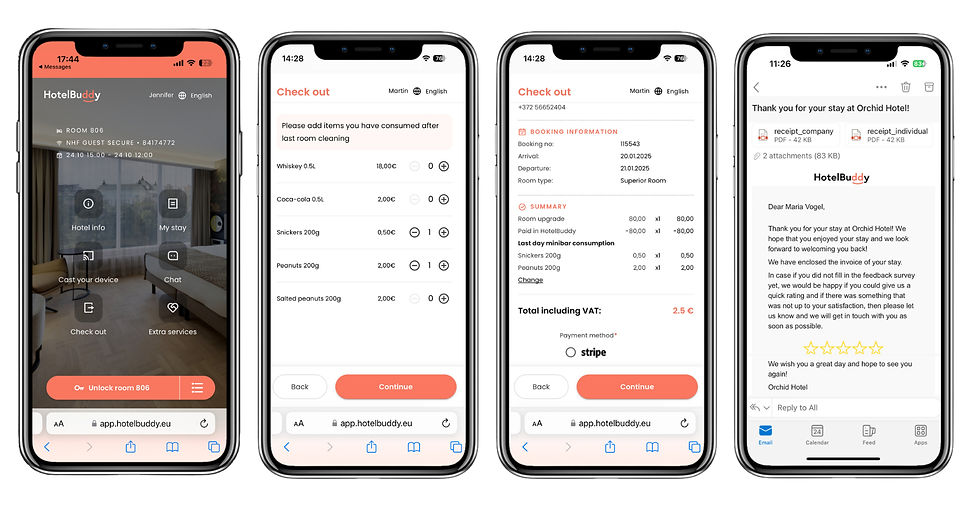
The guest opens the checkout page in HotelBuddy. They can begin checkout from their mobile device at any time on the day of departure.
If the hotel uses a minibar, HotelBuddy asks the guest to confirm consumption. Guests can easily report what they used since the last room cleaning. Any minibar charges added by the guest are automatically included in the final calculation.
The guest sees their live folio balance. HotelBuddy displays an up-to-date breakdown of all charges and payments pulled directly from the PMS.
The guest pays any outstanding balance online. Payment takes place securely through the hotel’s PSP, and HotelBuddy receives only the success confirmation.
The PMS folio updates instantly. Once PSP confirmation is received, the final payment is posted to the reservation’s folio, ensuring accurate financial records.
If the balance is fully settled, HotelBuddy completes the checkout. The reservation status updates automatically, with no staff action required.
The PMS marks the room as dirty and ready for housekeeping. This allows housekeeping to plan their workflow efficiently, without relying on manual status updates.
The guest receives their invoice automatically. A final invoice or folio summary is delivered via email for a professional, seamless departure experience.
This digital checkout process eliminates front-desk queues, reduces operational effort, and ensures a clean, real-time handover between departments — with no paperwork and no manual PMS updates.
Guest Survey
Once the guest has checked out, HotelBuddy continues to support a smooth, connected experience by automating key follow-up communications and closing out operational tasks.
After departure, HotelBuddy can automatically:
Send a personalized thank-you message, including loyalty incentives, special offers, or promotions.
Deliver the final invoice, retrieved directly from the PMS, ensuring the guest receives an accurate, official copy of their folio.
Automatically trigger a review request directing guests to your preferred feedback platform (such as TripAdvisor or Google), helping improve your online reputation and engagement.
Ensure that the PMS record is fully closed, all billing is finalized, and all linked systems reflect the completed stay with accurate, synchronized data.
This automated post-stay workflow wraps up the guest journey with professionalism and consistency, while reducing follow-up tasks for the hotel team.

Why choose Hotelbuddy?
At its core, HotelBuddy acts as an invisible yet essential layer between your guests and your PMS — supporting every phase of the guest journey, from pre-arrival to post-departure.
By reducing manual admin work, eliminating errors, and enabling automation where it makes sense, HotelBuddy lets your front office staff focus on meaningful, high-value interactions with your guests. Read more about the Benefits of Hotelbuddy
Ready to experience how HotelBuddy can work for your property?
Book a free discovery call and let’s explore your hotel's needs together.


