
HotelBuddy App For Hotel Guests
Manage your hotel stay from your phone with contactless HotelBuddy app.
HotelBuddy is a digital guest app provided by your hotel. It allows you to check in, open your room door, communicate with reception, check your room bill, order services and check out — all from your mobile phone browser. No app download is required.

Open the email or SMS sent by your hotel
Before your arrival, your hotel will send you an email or SMS inviting you to complete online check-in and access your personal HotelBuddy dashboard. Look for a message from your hotel or an email sent from check-in@hotelbuddy.eu.
You can use the same HotelBuddy link throughout your stay to return to your dashboard — no username, password, or app download needed.
Tip: If you can’t find the message, check your spam or promotions folder.

Click the secure HotelBuddy link to register
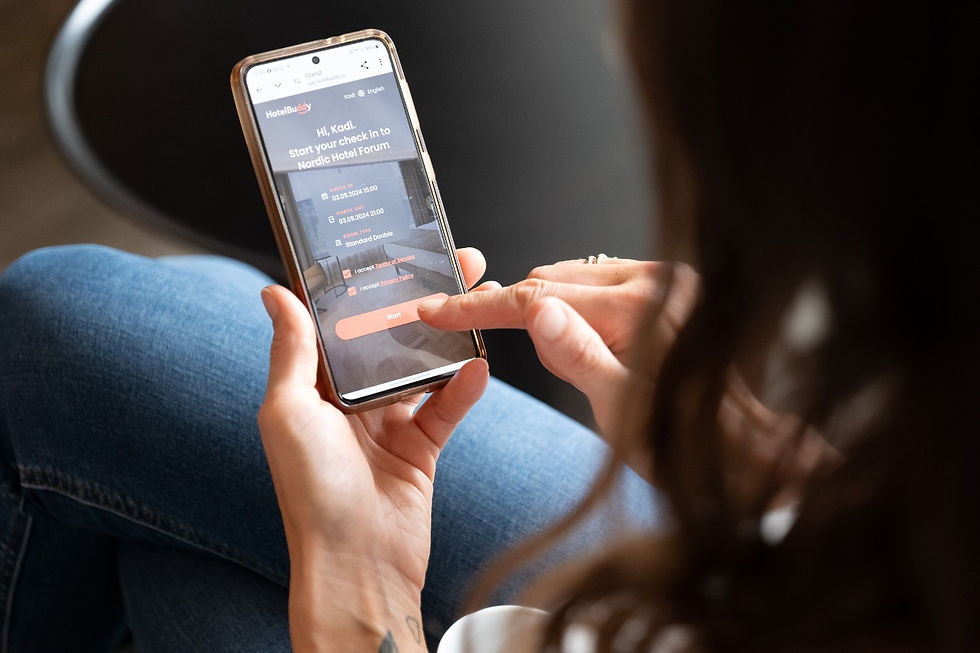
Once you’ve found the email or SMS, click the secure link to start online check-in. The hotel will ask for your personal details, document information, and arrival details.
If your hotel has enabled multiple languages, you can switch to your preferred language using the language dropdown.
You may also see optional extra services, such as transfers, restaurant bookings, or spa treatments and you can submit special requests like a quiet room or a higher floor to help the hotel prepare for your arrival.

Access services from your personal dashboard
Once you have completed the registration, you can access the self service area.
HotelBuddy works without usernames or passwords, it is connected to your reservation. Your access is secured through the unique link sent to you by the hotel via email or SMS and it starts with https://app.hotelbuddy.eu/
Use this link whenever you want to access the guest area to browse hotel information, view your bill, order services, chat with the reception desk, open doors and check out.
How To Log Into HotelBuddy As A Hotel Guest
What Can Hotel Guests Do With HotelBuddy
Check in and out of the hotel
Complete your contactless check-in online before arrival in 2-3 minutes so you do not have to wait in line and fill out paper forms upon arrival.
During your stay, you can view your bill and see extra charges (like room service) in real time and, when it’s time to leave, pay and check out directly from your phone. You'll receive your invoice digitally.

Access digital hotel directory
Your HotelBuddy dashboard gives you quick access to everything the hotel offers: browse practical information such as opening hours, breakfast times, and hotel facilities, explore available services, and place orders directly from your phone. If you have a question, you can contact the reception desk via chat at any time.
Please note that available features may vary depending on the hotel.

Open doors with digital keys
If your hotel offers mobile keys, your phone becomes your room key: open your room door, hotel front door, gym, parking gate etc. To use mobile keys, your phone needs to be connected to the internet (via mobile data or the hotel’s Wi-Fi).
This way, you don’t have to carry plastic key cards — or you can use both, if you prefer.


Become Part of the HotelBuddy Community
Your feedback helps us grow! If you used Hotelbuddy during your stay leave a review on Tripadvisor or post about it on Instagram and we will reward you with Buddy tokens - Hotelbuddy virtual shares.
How to earn Buddy Tokens:
FAQ About Hotelbuddy App
No. HotelBuddy works directly in your mobile browser. You don’t need to download or install anything.
Your hotel sends you a secure link by email or SMS. Simply open the link to access your personal HotelBuddy dashboard. No username or password is required.
Please check your spam or promotions folder for an invitation to complete online check-in from your hotel. You can also look for emails sent from check-in@hotelbuddy.eu.
If you still can’t find the message, contact the hotel reception and ask them to resend your access link.
In some cases, the hotel may not have your email address or mobile number before your arrival. If this happens, you can provide your contact details during check-in and ask the reception desk to send you an access link to the HotelBuddy self-service area.
Your access starts once the hotel sends you your personal HotelBuddy link. This timing varies by hotel — some send the link up to 7 days before arrival, while others send it 1–2 days before your stay. Once you complete your personal details, you’ll have access to your HotelBuddy dashboard.
The same access link remains active during your stay and stops working after check-out.
Using HotelBuddy is completely optional. You can always visit or contact the reception desk if you prefer personal assistance.
HotelBuddy is a self-service area designed for convenience — it’s there if you want to find quick answers, chat with the reception desk, book services, or skip queues and in-person interactions during your stay.
Yes. Your access link is personal and secure, and your data is handled according to hotel and data protection standards. Access is limited to the duration of your stay.
Depending on what your hotel offers, you can check in and out, view your bill, order services, chat with reception, access hotel information, cast Netflix or Spotify to hotel TV, pay, use mobile keys, rate your stay and leave feedback.
You will get access to the HotelBuddy dashboard once you have completed the online check-in by filling your personal data, signing the registration card and paying (if required). Hotelbuddy will notify you on the day of arrival when your room is ready.
If your hotel offers mobile keys, you can use your phone to open your room door and selected hotel areas. Your phone needs to be connected to the internet (mobile data or hotel Wi-Fi).
Yes. If you prefer, you can use a plastic key card instead of mobile keys, or use both during your stay.
Unfortunately, no. HotelBuddy can only be used when a hotel has an agreement with HotelBuddy and provides access to its guests. If you haven’t received an access link from your hotel, it may mean that the hotel does not use HotelBuddy or that it uses a different self-service platform.
We update our list of partner hotels regularly. The quickest way to stay up to date is to follow HotelBuddy on Instagram and check the Hotels highlights.
Buddy tokens are virtual shares of HotelBuddy you can earn by helping us grow - referring clients, leaving reviews, sharing your experiences. We have allocated 3 000 tokens to share the future value of HotelBuddy Technology OÜ with token recipients. On 28.07.2022 these tokens equaled to 1% of our company's share capital. We promise to buy back all tokens in case of an exit.
-
You will have an opportunity to exchange your tokens into real money
-
Every token’s value will be growing with the company
-
You will become part of the BUDDY community and will be the first to receive news, updates and special offers
-
Becoming a BUDDY community member you support us with the mission of helping the hotels to offer better services to their guests
-
After completing the form on our web site, we will review it and once the submission will be confirmed you will receive an invitation to accept a BUDDY token on your email. Once you accept the token, you will have an opportunity to set up your account in KOOS environment.
NB! You don't need to be personally identified while collecting tokens, as the collection is based on a person's email address or phone number. You can use the rights arising from the BUDDY Token to receive shares or trade tokens if you are registered as a token owner in the KOOS environment of our official registrar.
To open a token account, you need to log into the KOOS environment and go through the identification process. In case you don't want to use the right to exchange tokens for shares yourself, you can designate a so-called beneficiary, i.e. a person who will receive the shares of the company instead of you for the tokens you have collected.
NB! The BUDDY Token terms and/or the KOOS environment may have restrictions on who cannot open a token account. These restrictions may also change over time. You can learn more about KOOS on their website.