
From Setup to Upselling: Optimize HotelBuddy to Boost Usage and Revenue

Updated: Oct 15, 2025
Whether you're new to HotelBuddy or have been using it for a while, small adjustments can lead to significant gains in guest engagement, upsell revenue, and check-in completion rates. Here’s how to get the most from the platform:
1. Optimize Your Guest Emails
The pre-arrival email is your guest’s first contact with HotelBuddy — and one of the most important. Avoid vague calls to action like “Check in online here.” Instead, explain clearly why the guest should check in online and what they gain from it.
Key benefits to highlight:
Skip paperwork and avoid queues at reception
Receive a notification when the room is ready
Book extras like early check-in if arriving ahead of time
Start a direct chat with reception anytime from their phone
Discover hotel services and plan their stay in advance
Guests are far more likely to complete their check-in when they understand the value — especially after a long trip, arriving at peak hour or very late at night.
Tip: Go to Settings → Guest Emails to view and customize all guest communication. Rewrite your emails focusing on why guests should use HotelBuddy.


2. Personalize by Guest Language
HotelBuddy automatically detects guest language from the PMS (via nationality, country or language field) and adjusts emails and the guest interface accordingly. This reduces confusion and increases trust.
This helps to:
Higher open and click-through rates
More completed check-ins
More confident service orders
Fewer questions at reception
Tip: Ensure that your channel manager and PMS pass the correct language field for each booking.

3. Whitelist HotelBuddy for Booking.com
Booking.com blocks most links and external email addresses in guest messages by default. If HotelBuddy is not whitelisted in your Messaging Security Settings, guests may not receive online check-in invitations or see the self-service link.
To ensure proper delivery and visibility, follow these steps:
Log in to your Booking.com Extranet.
Go to: Inbox → Booking.com Messages → Messaging Preferences
Click the “Security Settings” tab (top right of the section).
Under “Your email addresses”, click Add and enter: check-in@hotelbuddy.eu
Under “Your approved links”, click Add and enter: https://app.hotelbuddy.eu
Click Save.
This update ensures that HotelBuddy messages are delivered and clickable — avoiding lost conversions due to hidden links.
Tip: Review this setting regularly, especially if your hotel has multiple Booking.com property IDs.

4. Add More Extra Services
Guests often don’t realize what extras are available unless you show them. Make it easy to discover and book small luxuries. HotelBuddy automatically shows all available services during online check-in, increasing the chance of bookings without any extra effort from your team.
Suggested extras:
Early check-in / late check-out
Bottle of wine or sweets in the room
Romantic setup for special occasions
In-room slippers, bathrobes
Transfers or local experiences
Tip: Add at least 6–8 extras to maximize upselling opportunities. Even simple items like slippers and bathrobes get booked when visible.
📖 Read more: Tips For Crafting Irresistible Product Descriptions

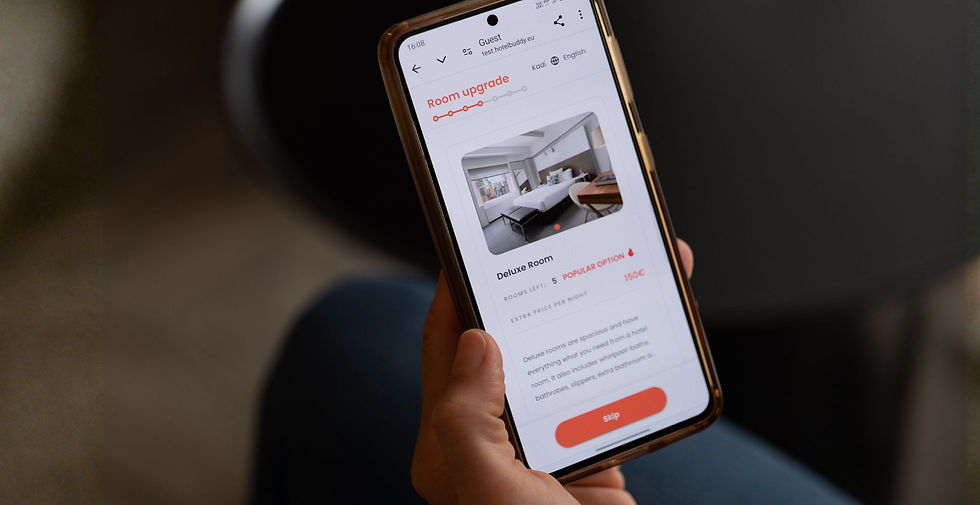
5. Improve Room Descriptions to Drive Upgrades
Room descriptions should sell the experience, not just list furniture. Generic listings like "TV, minibar, desk" don’t help guests compare options. Instead:
Focus on benefits: “Spacious corner room with sunset views”
Address guest types: “Perfect for couples or solo travelers”
Highlight differences: “Upgrade to Superior for a king bed, balcony, and bathtub”
Include a last-minute upgrade deal during online check-in
Tip: Think like a guest — what would help you decide to book a better room? Always explain what’s better in the next category — that’s what sells the upgrade.
6. Set Up Automation Rules for HBA and Payments
To avoid manual errors and wasted time, make sure you have set up HotelBuddy-approved (HBA) tags and payment rules. This allows HotelBuddy to activate automatically for all relevant bookings. You can also define rules by booking source, rate type, or room category to define prepaid or travel agency bookings and restrict room upgrades for certain booking types.
Benefits include:
More guests completing check-in and registration in advance
Less paperwork and less queuing at reception
Higher upsell conversion rates
Hours of reception work saved
No manual errors
Tip: Ask your HotelBuddy Account Manager to audit your automation setup — it takes 15 minutes and prevents hours of manual work.

7. Add HotelBuddy to Website and Social Media
Guests are more likely to use HotelBuddy if they’ve heard about it before arrival. Add a short explanation to your website, FAQ section, or booking confirmation email. This builds familiarity and makes guests more likely to complete check-in in advance.
Post about it on social media or include it in pre-stay communication:
You’ll receive a link to check in online and access your digital room key.
No app needed — everything works through your browser.
Tip: Ask your marketing team to include HotelBuddy in a pinned Instagram story or as a website banner.

8. Promote HotelBuddy On-Site
Last minute bookings or bookings from OTAs can arrive at the hotel without a guest email or phone number, making it impossible to send pre-arrival communication. These guests won’t know about HotelBuddy unless your front desk introduces it in person. That’s why on-site visibility and staff engagement are key to increasing usage during the stay.
Place printed materials in visible areas:
A4 signs in guest rooms and elevators
Flyers or cards at the reception desk
Digital displays in public areas
Use our Canva template to create branded materials that explain:
What HotelBuddy is
How to use the self-service guest area
That no app download is required
Train your front desk team to:
Mention HotelBuddy at check-in
Ask the guests if they would like to use self service and add HBA to their reservation if missing.
Explain that this allows them to chat with reception, book services, and check out online from their phone
Tip: Don’t wait for the email to do the work — encourage your team to introduce HotelBuddy in person, especially when guest contact data is missing.

9. Let Your Team Experience HotelBuddy
Your reception staff is your first line of support for guests using HotelBuddy. Make sure every team member completes a test check-in and explores the digital guest journey from start to finish. Hands-on experience builds confidence and ensures they can explain everything clearly to guests.
That includes:
Filling out the registration card
Upgrading their room
Booking an extra service
Using the chat and testing the mobile key
Reviewing how payment and check-out work
Tip: Add HotelBuddy training to your front desk onboarding checklist — especially for seasonal and new hires.
Need Help Implementing These Tips?
Optimizing your HotelBuddy setup can lead to fewer reception queues, more online check-ins, and increased extra service sales — all with less admin work. If you’d like help reviewing any of the points above, reach out to your HotelBuddy Account Manager. We’ll gladly assist with:
Updating guest email templates
Reviewing payment automation or HBA rules
Setting up extra services
Personalizing your on-site signage
Training new staff members
We’re here to help you get the most value from HotelBuddy — every day, with every guest.


